Pocket DSP Speaker & Room Analyzer
Find what's holding your system back.
Pocket DSP measures your sound system and tells you what's wrong with it, what to do about it, and shows you the data behind every call.
Coming to iPhone and iPad. Not on the App Store yet.
It takes the system apart.
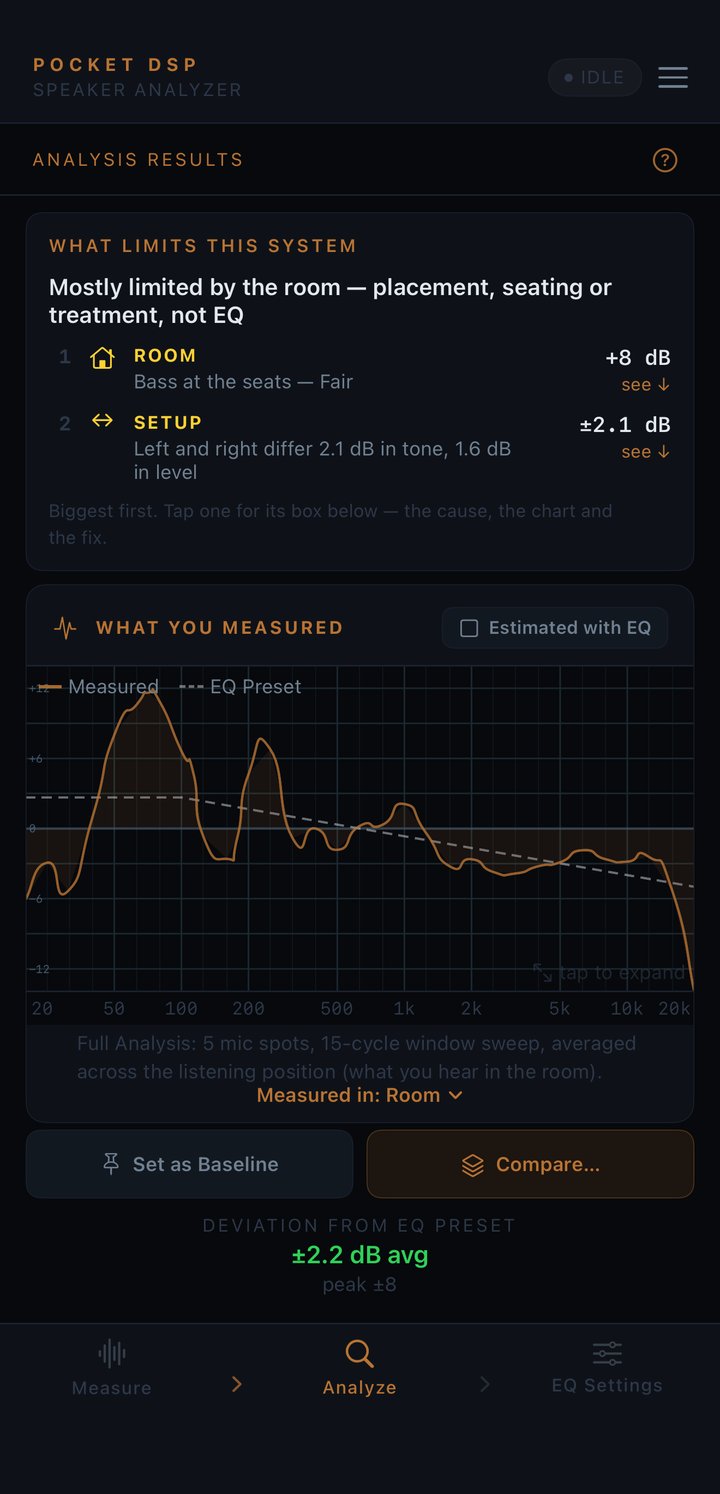
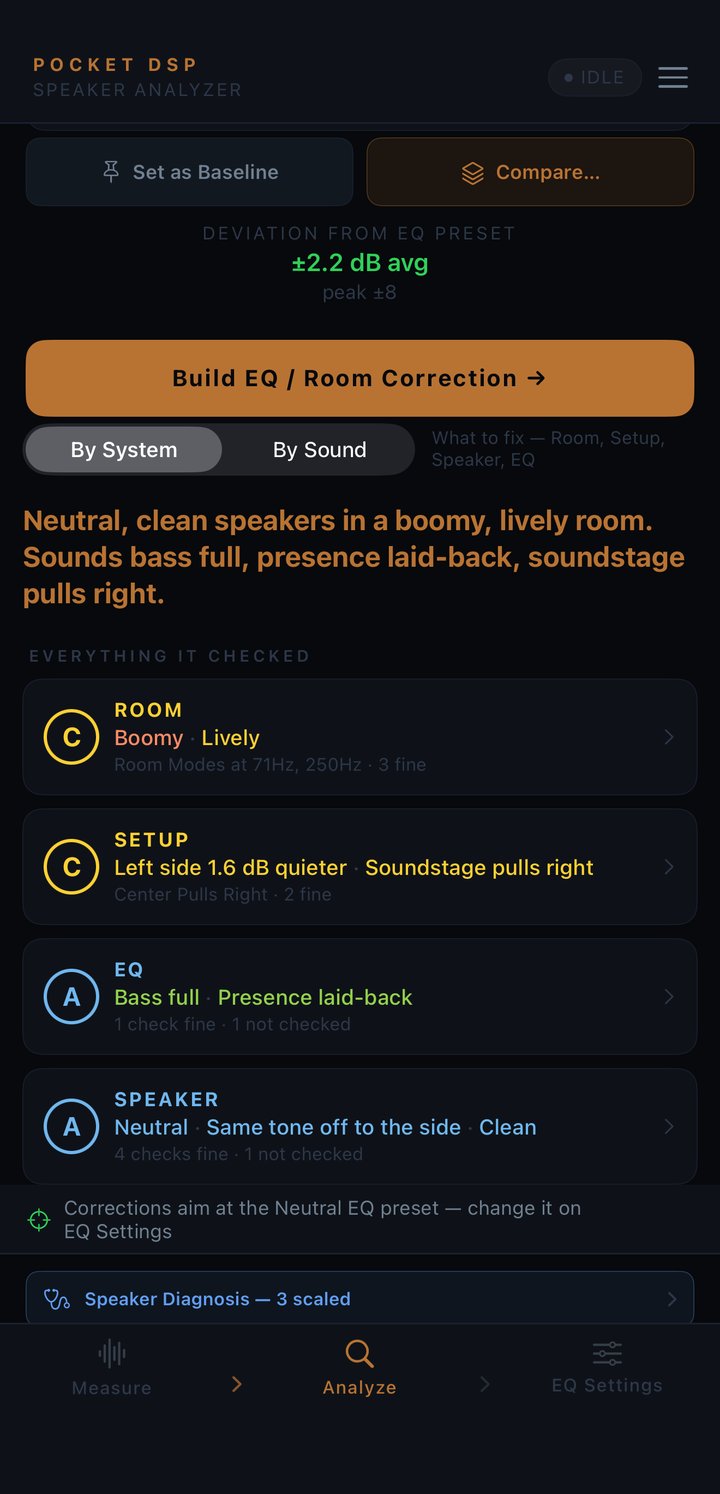
It takes the system apart — the room, the setup, the speakers, the EQ — grades each part from what it measured, and ranks what is actually holding you back. Every row carries the chart it was read from.
Every measurement feeds one answer: what your system is doing, which part of it is costing you the most, and whether the fix is placement, aim, timing, the speaker itself — or, last of all, a filter.
It averages several spots around your seat, bass to treble: that is what you hear, and what the EQ follows. Then it sweeps one speaker with the room's late reflections gated out. Comparing the two — and a close-up sweep at the woofer for the bass — is how it tells a room problem from a speaker problem instead of guessing.
Room
Modes, seats, decay, reflections.
Setup
Match, timing, aim, crossover.
Speaker
Smoothness, distortion, reach.
EQ
Your system against your EQ preset.
Show you everything, and leave the reading to you.
Fix it for you, behind the scenes.
Tells you what’s wrong, shows you why, and how to fix it.
Pocket DSP works through your system piece by piece — speaker, room, setup, EQ — says which piece is costing you and how sure it is, walks you through fixing it, then fills in the gaps with room correction and EQ if you want them.
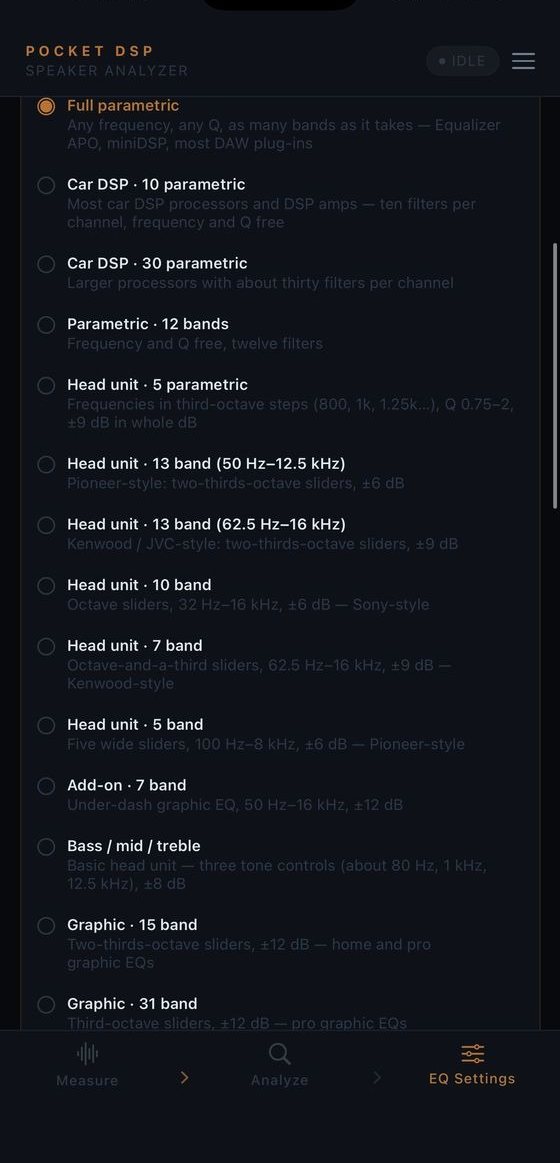
The EQ it builds is matched to the EQ you already own: a car DSP, a head unit, a graphic EQ or software.
The Difference
Room correction works only with filters and other digital correction. It changes the signal, not the room.
It can't move a speaker, re-aim it, treat a wall, or stop a reflection canceling the sound, so those problems just get patched over.
Pocket DSP shows you what the problem is and the best fix for it, whether it's in the room, the setup, the speaker or the EQ.
The causes come first.
A filter can't move a speaker, re-aim it, or stop two drivers arriving at different times. So the app deals with those first: placement for the sub and the speakers, ranked by measurement. Which surface is sending the reflection back, and how far away it is. Where to aim the speakers. The crossover point your drivers actually want. The delay and polarity that line the sub up with the mains.
Plus the things a sweep can't see: three bass hits to check the punch, a slow sweep that hunts for rattles, and a two-volume check that finds out how much louder it goes before the amp or driver runs out.
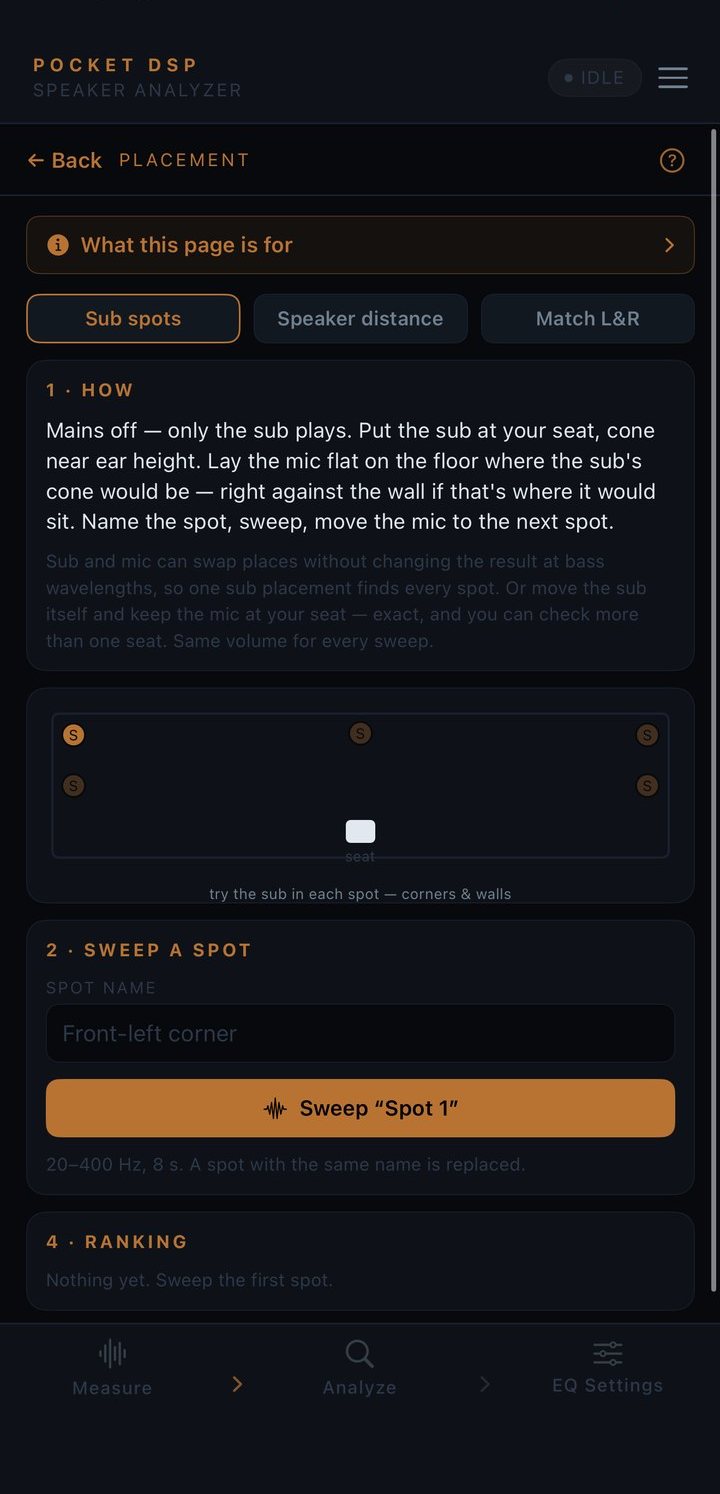
Placement, Baffle & Setup
EQ and room correction fill the gap.
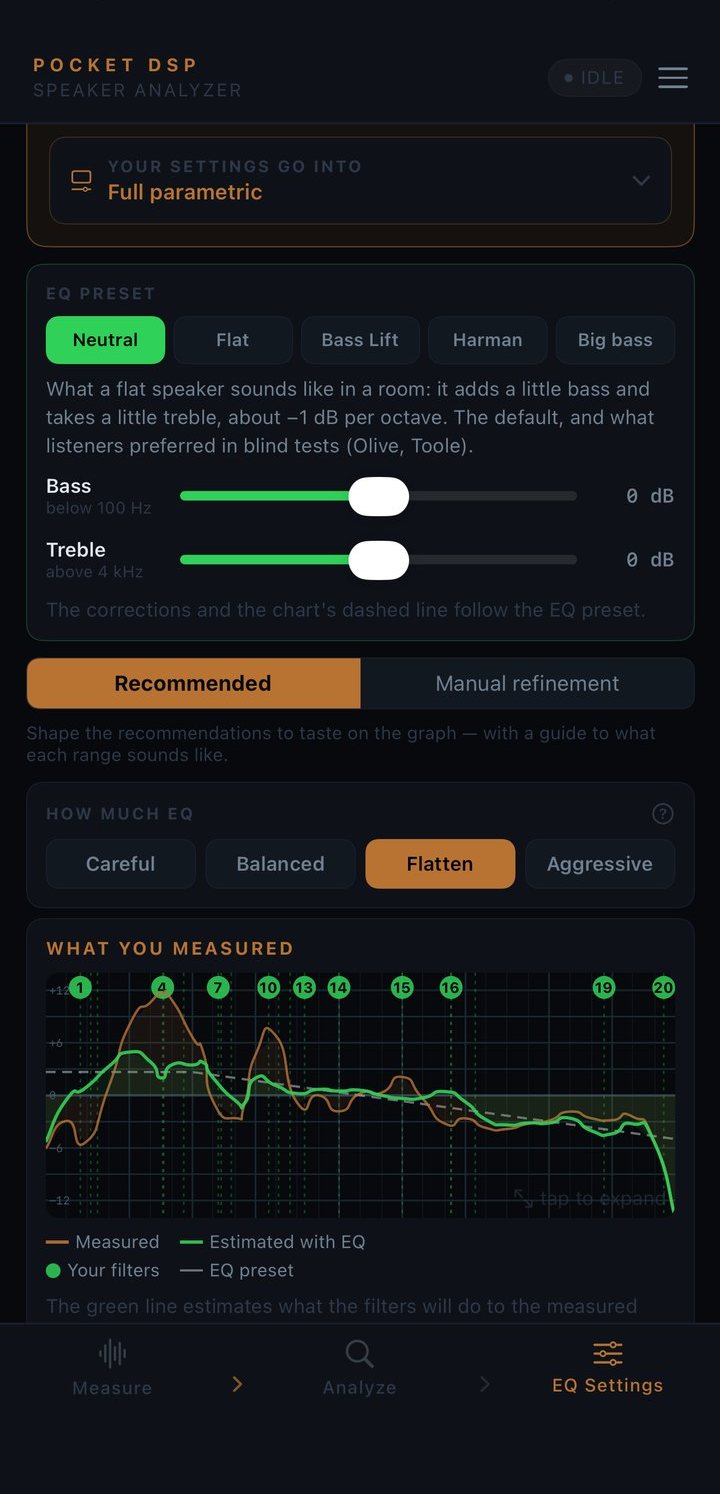
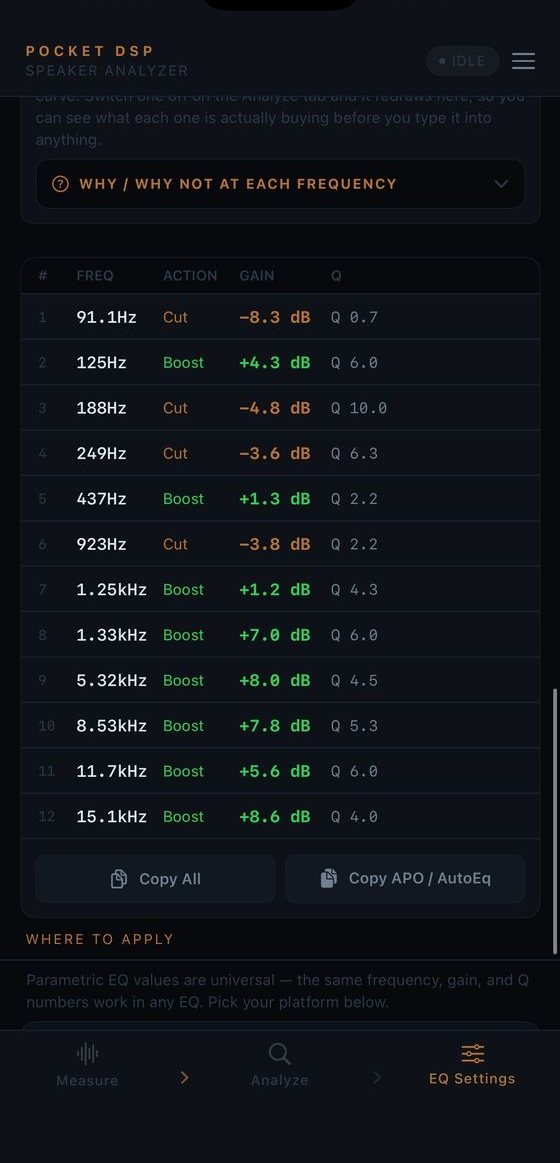
What's left after the causes are dealt with is what a filter is actually good at: the room's bass modes at your seat, and the speaker's own tonal shape. Pocket DSP builds both from what it measured — several spots around your seat averaged, checked against the speaker's own curve — fitted to the gear you're using, whether that's a car DSP, a head unit, a graphic EQ, or software like Equalizer APO, AutoEq or eqMac.
Pick a preset — Neutral, Flat, Bass Lift, Harman or Big Bass — and how hard to correct, from Careful to Aggressive. It won't chase a dip EQ can't fix, like a cancellation from a reflection or a null the room makes, and tapping any band tells you why it was or wasn't corrected. Refine it by hand on a full-screen chart if you want to.
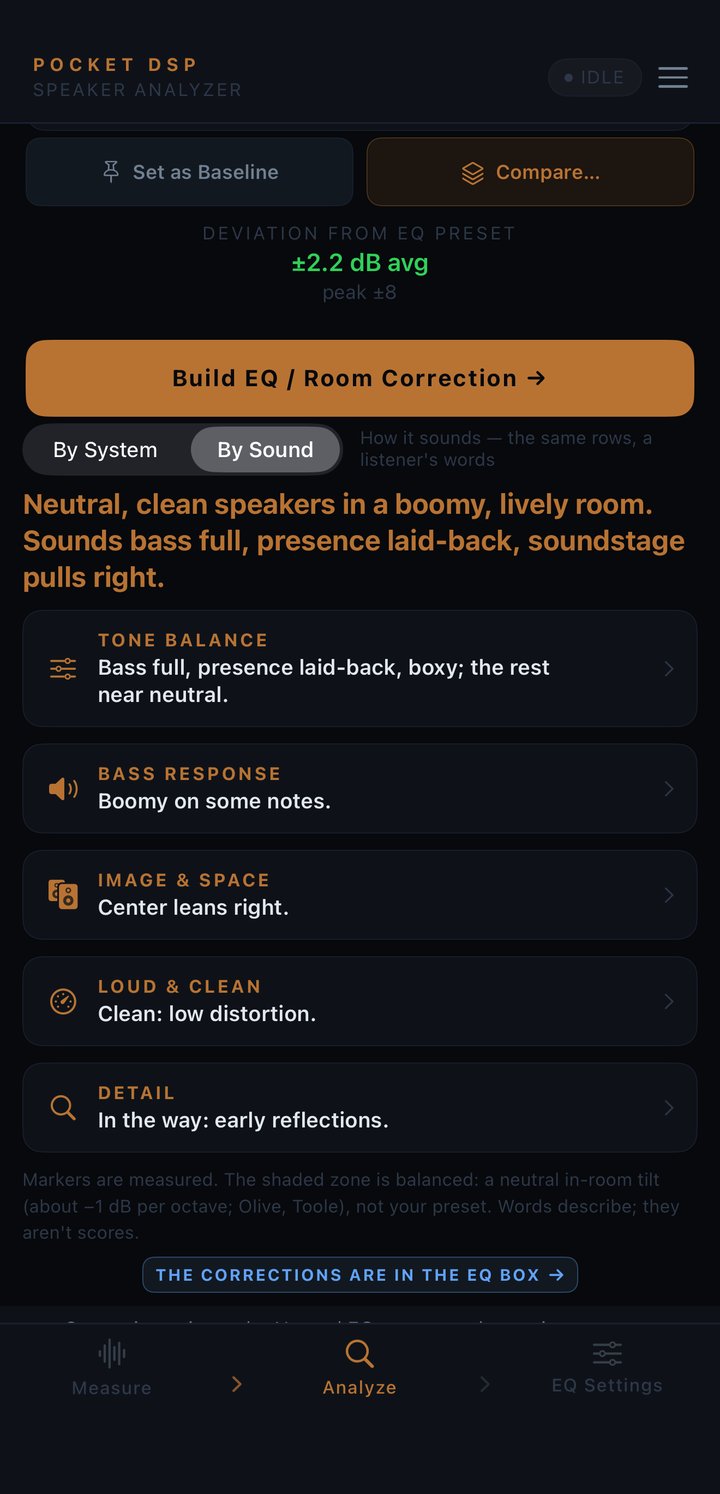
Inside the App
Refine It by Hand
Four boxes, a grade each, and the working shown.
Room, Setup, Speaker and EQ each get a letter and a list of rows. Every row shows its measured number on a scale with the thresholds marked, one bold line with the figure that matters, and a chart you can open to see exactly what it was read from.
The thresholds are not invented. Bass that keeps ringing is judged against where it becomes audible with music — roughly 0.5 s at 63 Hz, 0.3 s at 125 Hz (Fazenda et al.). Room decay against the 0.2–0.35 s a treated room aims for (EBU Tech 3276, ITU-R BS.1116) and the 0.3–0.5 s of a furnished living room. Distortion against where it starts to be heard: about 2% through the midrange, 10% in the deep bass. Tone against the gentle −1 dB per octave a flat speaker reads in a room (Olive, Toole). Where a line is our own call, the app says so and leaves that row out of the letter.
Where a reading isn't certain, it says so and says what to run to settle it. Rows the measurement can't support stay grey rather than being guessed at. The same results read a second way under By Sound — boomy, laid-back, pulls right — with each word pointing back at the row that owns it.
Every Row Shows Its Working
A number on a scale with the thresholds marked, the figure that matters in one bold line, and the chart it came from. The marks on the scale come from published listening research. Tap any shot to enlarge it.
Said plainly in the app, on every box: the numbers are measured, the bands come from published or practical limits, and how much each row counts toward the letter is our weighting, not a standard.
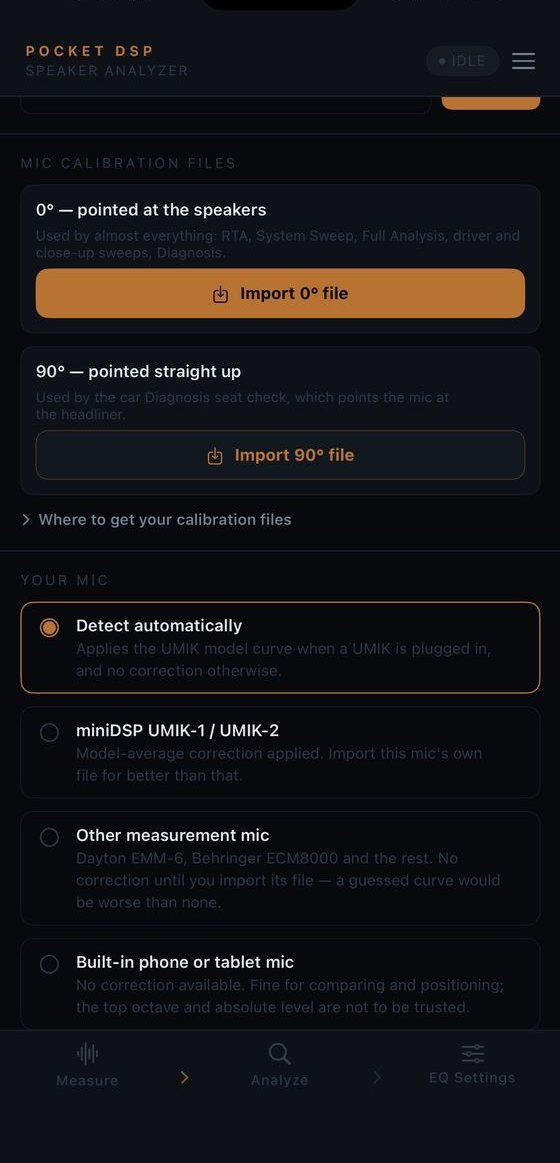
Use your measurement mic.
Plug in a USB measurement mic and import its calibration file, so every reading is corrected for that exact mic. It takes both 0° (pointed at the speakers) and 90° (pointed up) files, and uses whichever fits the measurement.
A miniDSP UMIK is recognized automatically. Other mics like the Dayton EMM-6 work with their own file. Your phone's built-in mic still works for quick checks and placement, and the app says where to trust it and where not to.
Every chart, if you want it.
The simple answers come first, but all the advanced data is there to dig into. Zoom into any chart and drag across it to read exact values.
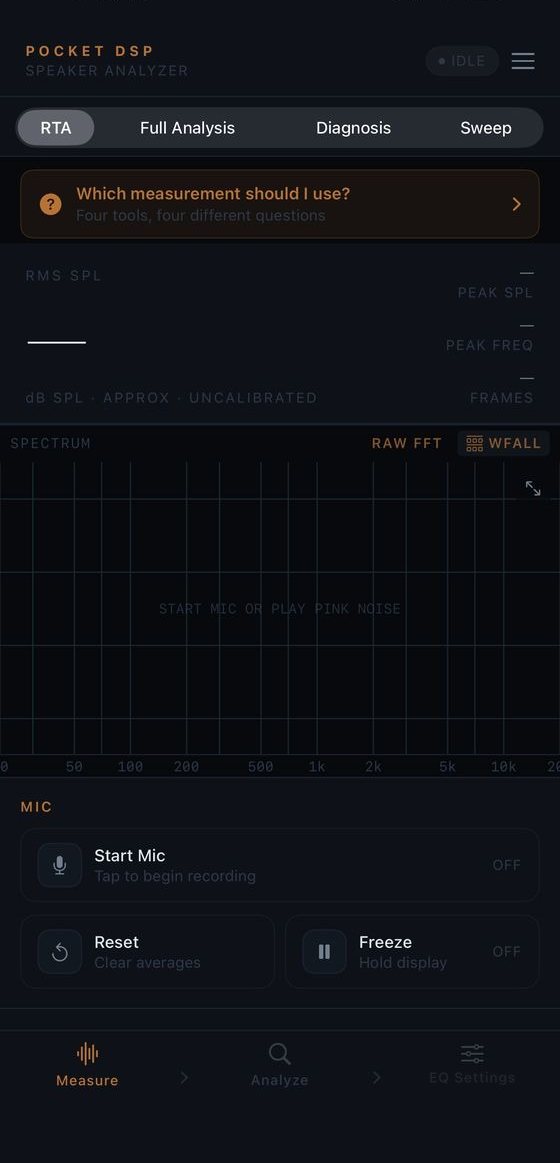
Plus the multi-seat spread, crossover sum, time alignment and the live RTA. Tap any chart to enlarge it. Shown with real measurements from the app.
What each tool does.
Room, car and outdoor modes. Calibrated mic files supported. Export to REW and FRD. A short guided tour on every page, and a full written guide in the app.
Free and Pro
Free
The live RTA and Capture & Analyze, with EQ suggestions for your system, plus the three Speaker Checks — punch, rattles and headroom. No account, no ads, no time limit.
Pro
Everything else: System Sweep, Full Analysis, Speaker Diagnosis, EQ and room correction, Crossover, Driver Sweep, Time Alignment, Placement, Baffle and saved projects. One purchase, not a subscription.
EQ & Room Correction
Built from your measurements once the causes are dealt with, fitted to your gear.
Room Modes
Bass notes your room boosts or cancels at your seat.
Room or Speaker
Which problems are the room's and which are the speaker's.
Headroom
How much louder it goes before the amp or driver runs out.
Distortion
How cleanly each driver plays, and where it starts to strain.
Punch
Whether a bass hit starts sharp and stops clean.
Rattles
Something buzzing that isn't the speaker, and the note it buzzes on.
Ringing
Resonances that keep sounding after the note stops.
Beaming
Where the treble narrows and drops off away from center.
Comb Filtering
Nearby surfaces reflecting sound back and cancelling parts of it.
Crossover
Drivers working against each other where they hand off.
Timing
Drivers and speakers reaching your ears at different times.
Left vs Right
Tone, level and timing differences that pull the image off center.
Speaker Placement
The flattest spot or distance for your sub and speakers.
Baffle Step
Bass lost to cabinet size, and the shelf that restores it.
Edge Diffraction
Ripples the cabinet's edges put into the midrange and treble.
Liveness
How long the room rings, and how treated it is for its size.
Seat to Seat
How much the sound changes from one seat to the next.
Coming to iPhone and iPad.
Not on the App Store yet.
Common questions, and how to reach us.
Can I use my phone's microphone?
Why won't it boost some dips?
I don't have parametric EQ.
Does it work in a car?
Do I need a quiet room?
Can I get my data out?
Where do the grades come from?
Should I EQ first or move things first?
Does it work over Bluetooth?
Does it set the EQ for me?
Contact
Reporting a Problem
Send the page you were on, room or car, which mic, and a screenshot.
Dyer Acoustics.
Dyer Acoustics makes measurement tools for people who build speakers, tune rooms and install car audio. Pocket DSP is the first product.
Privacy
Everything stays on your phone. No account, no tracking. The mic is only used while measuring.